[Spring] YAML(YML) 문법과 Spring Boot 설정(@ConfigurationProperties, Profile) 정리
YAML(YML)의 기본 문법과 자료형, Spring Boot에서 @ConfigurationProperties와 Profile로 환경별 설정을 관리하는 방법, 그리고 .properties 파일과 비교했을 때의 장단점을 정리합니다.
YAML(YML)이란?
YAML은 사람이 쉽게 읽고 쓸 수 있는 데이터 직렬화 양식입니다. 초기에는 Yet Another Markup Language라는 이름이었으나, 마크업 언어가 아닌 데이터 중심 규격임을 강조하기 위해 YAML Ain't Markup Language라는 재귀적 약자로 바뀌었습니다.
YAML의 3가지 장점
- 우수한 가독성: XML의 닫는 태그나 JSON의 괄호(
{}), 쉼표(,) 없이 들여쓰기 기반 계층 구조로 표현되어 직관적입니다. - 명확한 자료형 지원: 스칼라(문자열·숫자·불리언), 리스트(배열), 맵(객체) 구조를 깔끔하게 표현합니다.
- 주석 작성 가능: JSON과 달리
#기호로 자유롭게 주석을 달 수 있어 설정 의도를 문서화하기 좋습니다.
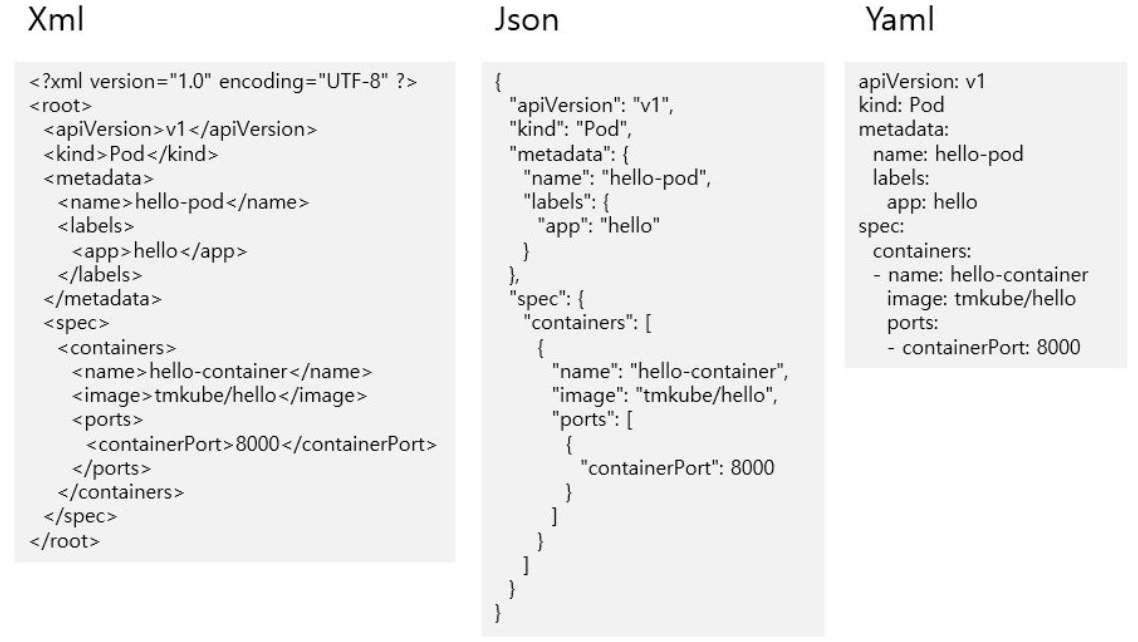
YAML 기본 문법과 자료형
1. 스칼라(Scalar) & 배열(List)
youtube:
  channel:
    - penbird
    - kyleschool
    - habithackers
2. 맵(Map / Object) & 주석(#)
youtube: # 유튜브 설정
  channel: # 채널 목록
    - name: penbird # 채널명
      type: ["keyboard and hand writings", "review"]
    - name: kyleschool
      type: ["data science and engineering", "tutorial"]
    - name: habithackers
      type: ["productivity", "training"]
Spring Boot에서의 YAML 활용
1. @ConfigurationProperties로 타입 안전한 설정 바인딩
YAML에 정의한 설정 값을 자바 객체(Bean)의 필드에 자동으로 매핑하고, @Validated와 함께 실행 시점 유효성 검증까지 수행할 수 있습니다.
@Component
@ConfigurationProperties(prefix = "taco.orders")
@Data
@Validated
public class OrderProps {

    @Range(min = 5, max = 25, message = "must be in 5~25")
    private int pageSize = 20;
}
taco:
  orders:
    pageSize: 10
Spring Boot는 내부적으로 spring-configuration-metadata.json 메타데이터를 기반으로 IDE 자동완성과 DataSourceProperties 같은 수많은 기본 설정 바인딩을 제공합니다.
{
  "properties": [
    {
      "name": "spring.profiles.active",
      "type": "java.util.List<java.lang.String>",
      "description": "Comma-separated list of active profiles."
    }
  ]
}
@ConfigurationProperties(prefix = "spring.datasource")
public class DataSourceProperties implements BeanClassLoaderAware, InitializingBean {
    private ClassLoader classLoader;
    private boolean generateUniqueName = true;
    private String name;
    private Class<? extends DataSource> type;
    private String driverClassName;
    private String url;
    private String username;
    private String password;
    // ...
}
2. Profile 분리 (prod, test)
운영(prod)과 테스트(test) 환경의 DB 연결 정보나 JPA ddl-auto 옵션을 파일별로 분리해 안전하게 관리할 수 있습니다.
application-prod.yml (운영 환경)
spring:
  datasource:
    url: jdbc:mariadb://localhost:3306/shop?serverTimezone=Asia/Seoul
    username: root
    password: ${DB_PASSWORD}
    driver-class-name: org.mariadb.jdbc.Driver
  jpa:
    hibernate:
      ddl-auto: none
application-test.yml (테스트 환경)
spring:
  datasource:
    url: jdbc:h2:tcp://localhost/D:/db/h2/taco
    username: sa
    password:
    driver-class-name: org.h2.Driver
.properties vs .yml 비교 및 주의사항
.properties는 매 줄마다 접두사를 반복해야 하지만, .yml은 중복을 제거해 훨씬 간결합니다.
# application.properties
spring.datasource.driverClassName=net.sf.log4jdbc.sql.jdbcapi.DriverSpy
spring.datasource.url=jdbc:log4jdbc:mariadb://localhost:3306/test?characterEncoding=UTF-8&serverTimezone=UTC
spring.datasource.hikari.username=root
spring.datasource.hikari.password=1234
spring.datasource.hikari.maximum-pool-size=10
# application.yml
spring:
  datasource:
    driverClassName: net.sf.log4jdbc.sql.jdbcapi.DriverSpy
    url: jdbc:log4jdbc:mariadb://localhost:3306/test?characterEncoding=UTF-8&serverTimezone=UTC
    hikari:
      username: root
      password: 1234
      maximum-pool-size: 10
YAML의 한계점: @PropertySource 미지원
.properties 파일은 클래스 상단에 @PropertySource 애노테이션을 붙여 임의의 설정 파일을 바로 불러올 수 있지만, Spring 기본 @PropertySource는 .yml 포맷을 직접 로드하지 못합니다 (별도 YamlPropertySourceFactory 커스텀이 필요함).
@Configuration
@PropertySource("classpath:/com/taco/application.properties")
public class AppConfig {

    @Autowired
    private Environment env;

    @Bean
    public TestBean testBean() {
        TestBean testBean = new TestBean();
        testBean.setName(env.getProperty("testbean.name"));
        return testBean;
    }
}
또한 메시지 국제화(messages.properties) 등 일부 기능은 .properties를 기본으로 사용합니다. (자세한 설정 우선순위 및 변환 방법은 Spring Boot Externalized Configuration 공식 문서를 참고하세요.)
참고: Spring Boot 설정 프로퍼티 우선순위 (높은 순)
동일한 키가 여러 곳에 정의되어 있을 경우 아래 순서대로 덮어쓰기가 적용됩니다.
- 유저 홈 디렉토리의
spring-boot-dev-tools.properties - 테스트 코드의
@TestPropertySource @SpringBootTest(properties = ...)애노테이션 속성- 커맨드 라인 인자 (
--server.port=9090) SPRING_APPLICATION_JSON환경 변수ServletConfig/ServletContext초기 파라미터java:comp/envJNDI 속성- Java 시스템 프로퍼티 (
System.getProperties(),-D...) - OS 환경 변수
RandomValuePropertySource(random.*)- JAR 외부의 프로파일별 설정 (
application-{profile}.yml/properties) - JAR 내부의 프로파일별 설정 (
application-{profile}.yml/properties) - JAR 외부의 기본 설정 (
application.yml/properties) - JAR 내부의 기본 설정 (
application.yml/properties) @Configuration클래스의@PropertySourceSpringApplication.setDefaultProperties기본 프로퍼티
[Spring Security] 스프링 시큐리티 인증·인가 구성 및 UserDetailsService 구현 정리
NEXT LOG →[Spring] Spring MVC HTTP 통신 핵심 애노테이션 총정리