[Spring] REST API 성숙도 Level 3 — Spring HATEOAS로 하이퍼미디어 링크 삽입하기
REST API 성숙도 모델의 최고 단계인 HATEOAS 개념을 이해하고, Spring HATEOAS의 EntityModel·CollectionModel·RepresentationModelAssembler를 활용해 응답 JSON에 동적 하이퍼링크(_links)를 삽입하는 방법을 정리합니다.
HATEOAS란?
기존의 일반적인 REST API 응답 방식에서는 클라이언트가 특정 리소스 URI를 하드코딩해 두어야 합니다. 만약 서버의 API URI 경로가 변경되면 클라이언트는 404 Not Found 에러를 마주하게 됩니다.
**HATEOAS (Hypermedia As The Engine Of Application State)**는 서버가 응답 데이터를 내려줄 때 현재 리소스와 연관된 다음 작업(상태 전이)을 수행할 수 있는 동적 URI 링크(_links)를 함께 포함시켜, 클라이언트가 서버와 동적으로 상호작용할 수 있도록 만드는 REST 아키텍처의 핵심 제약 조건입니다.
REST API 성숙도 모델 (Richardson Maturity Model)
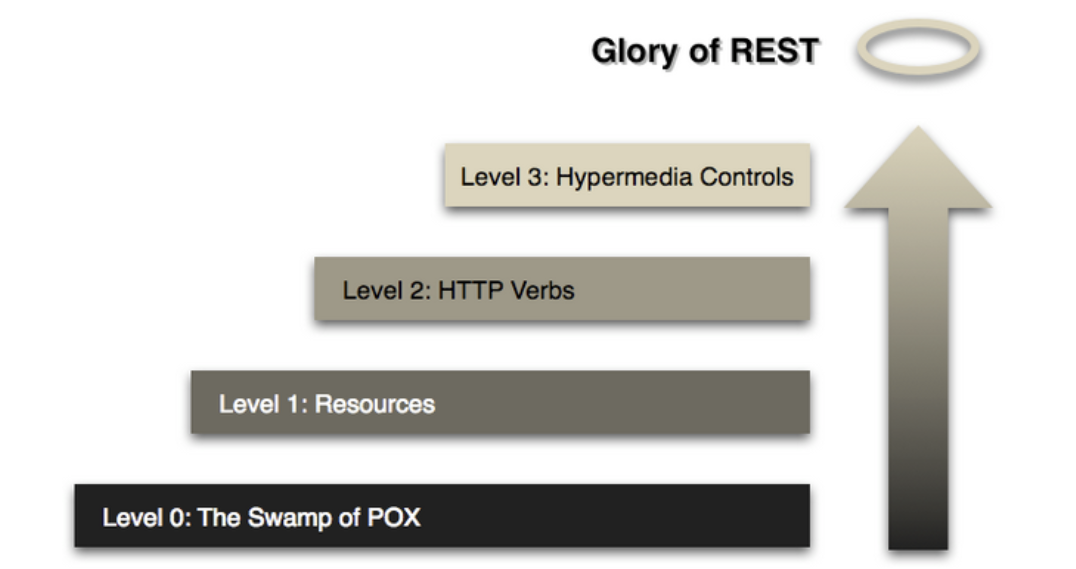
리처드슨의 REST 성숙도 모델에서 HATEOAS는 가장 높은 Level 3 단계에 해당합니다. (참고: REST API 성숙도 모델)
의존성 추가 및 Spring Boot 2.2+ 클래스명 변경
// build.gradle
implementation 'org.springframework.boot:spring-boot-starter-hateoas'
Spring Boot 2.2(Spring HATEOAS 1.0) 이상부터는 기존 클래스 명칭이 직관적인 Model 접미사로 개편되었습니다.
| Spring Boot 2.2 이전 | Spring Boot 2.2 이후 (현재 표준) |
|---|---|
ResourceSupport |
RepresentationModel |
Resource |
EntityModel |
Resources |
CollectionModel |
PagedResources |
PagedModel |
ResourceAssembler |
RepresentationModelAssembler |
ControllerLinkBuilder |
WebMvcLinkBuilder |
1. 컨트롤러에서 직접 하이퍼링크(_links) 추가하기
리스트 형태의 데이터를 반환할 때는 CollectionModel.of()로 감싸고, WebMvcLinkBuilder의 linkTo(methodOn(...))를 이용해 특정 컨트롤러 메서드의 URI를 동적으로 추출해 링크를 삽입합니다. URI가 변경되더라도 코드 수정 없이 항상 올바른 링크가 생성됩니다.
import static org.springframework.hateoas.server.mvc.WebMvcLinkBuilder.linkTo;
import static org.springframework.hateoas.server.mvc.WebMvcLinkBuilder.methodOn;

@RestController
@RequestMapping(path = "/api/design", produces = "application/json")
@RequiredArgsConstructor
@CrossOrigin(origins = "*")
public class DesignTacoApiController {

    private final TacoRepository tacoRepository;

    @GetMapping("/recent")
    public CollectionModel<Taco> recentTacos() {
        PageRequest pageRequest = PageRequest.of(0, 12, Sort.by("createdAt").descending());
        List<Taco> tacos = tacoRepository.findAll(pageRequest).getContent();

        CollectionModel<Taco> recentResources = CollectionModel.of(tacos);
        Link link = linkTo(methodOn(DesignTacoApiController.class).recentTacos())
                .withRel("recents");
        recentResources.add(link);

        return recentResources;
    }
}
응답 JSON 결과:
{
  "_embedded": {
    "tacoList": [
      {
        "id": 2,
        "createdAt": "2022-06-18T19:07:13.816+00:00",
        "name": "taco123",
        "ingredients": [
          { "id": "FLTO", "name": "Flour Tortilla", "type": "WRAP" },
          { "id": "GRBF", "name": "Ground Beef", "type": "PROTEIN" }
        ]
      }
    ]
  },
  "_links": {
    "recents": {
      "href": "http://localhost:8080/api/design/recent"
    }
  }
}
2. RepresentationModelAssembler로 각 항목마다 링크 생성하기
컬렉션 내 개별 Taco 아이템 각각에도 self 링크를 붙이려면 반복문 대신 RepresentationModelAssembler를 구현하는 것이 깔끔합니다.
또한 엔티티의 내부 DB PK(id)를 그대로 노출하는 대신, RepresentationModel을 상속한 전용 리소스 DTO(TacoResources)를 만들어 _links.self.href로 리소스 주소를 대체할 수 있습니다.
리소스 모델 DTO (TacoResources)
@Relation을 사용하면 JSON _embedded 내부의 컬렉션 키 이름(예: tacoList → tacos)을 원하는 이름으로 깔끔하게 지정할 수 있습니다.
@Relation(value = "taco", collectionRelation = "tacos")
public class TacoResources extends RepresentationModel<TacoResources> {

    @Getter
    private final String name;

    @Getter
    private final Date createdAt;

    @Getter
    private final List<Ingredients> ingredients;

    public TacoResources(Taco taco) {
        this.name = taco.getName();
        this.createdAt = taco.getCreatedAt();
        this.ingredients = taco.getIngredients();
    }
}
어셈블러 구현 (TacoResourceAssembler)
toModel(): 단일 엔티티를EntityModel<TacoResources>로 변환하고 개별self링크를 추가toCollectionModel(): 전체 컬렉션에 대한 공통 링크(self,recents)를 추가
@Component
public class TacoResourceAssembler
        implements RepresentationModelAssembler<Taco, EntityModel<TacoResources>> {

    @Override
    public EntityModel<TacoResources> toModel(Taco taco) {
        return EntityModel.of(
                new TacoResources(taco),
                linkTo(methodOn(DesignTacoApiController.class).findTacoById(taco.getId())).withSelfRel()
        );
    }

    @Override
    public CollectionModel<EntityModel<TacoResources>> toCollectionModel(
            Iterable<? extends Taco> tacos) {
        return RepresentationModelAssembler.super.toCollectionModel(tacos).add(
                linkTo(DesignTacoApiController.class).withSelfRel(),
                linkTo(methodOn(DesignTacoApiController.class).recentTacos()).withRel("recents")
        );
    }
}
컨트롤러 적용
@RestController
@RequestMapping(path = "/api/design", produces = "application/json")
@RequiredArgsConstructor
@CrossOrigin(origins = "*")
public class DesignTacoApiController {

    private final TacoRepository tacoRepository;
    private final TacoResourceAssembler assembler;

    @GetMapping("/recent")
    public CollectionModel<EntityModel<TacoResources>> recentTacos() {
        PageRequest pageRequest = PageRequest.of(0, 12, Sort.by("createdAt").descending());
        List<Taco> tacos = tacoRepository.findAll(pageRequest).getContent();

        return assembler.toCollectionModel(tacos);
    }

    @GetMapping("/{id}")
    public ResponseEntity<Taco> findTacoById(@PathVariable Long id) {
        return tacoRepository.findById(id)
                .map(taco -> new ResponseEntity<>(taco, HttpStatus.OK))
                .orElseGet(() -> new ResponseEntity<>(null, HttpStatus.NOT_FOUND));
    }
}
응답 JSON 결과:
{
  "_embedded": {
    "tacos": [
      {
        "name": "taco1",
        "createdAt": "2022-06-18T19:31:40.148+00:00",
        "ingredients": [
          { "id": "FLTO", "name": "Flour Tortilla", "type": "WRAP" },
          { "id": "GRBF", "name": "Ground Beef", "type": "PROTEIN" }
        ],
        "_links": {
          "self": {
            "href": "http://localhost:8080/api/design/2"
          }
        }
      }
    ]
  },
  "_links": {
    "self": {
      "href": "http://localhost:8080/api/design"
    },
    "recents": {
      "href": "http://localhost:8080/api/design/recent"
    }
  }
}
3. 중첩된 하위 객체(Ingredient)에도 링크 삽입하기
TacoResources 내부에 포함된 ingredients 리스트 역시 일반 List<Ingredient> 대신 CollectionModel<EntityModel<IngredientResources>>로 변환하면, 중첩 객체 안에서도 각각의 상세 URI를 참조할 수 있습니다.
@Getter
@Setter
@Relation(value = "ingredient", collectionRelation = "ingredients")
public class IngredientResources extends RepresentationModel<IngredientResources> {

    private String name;
    private Type type;

    public IngredientResources(Ingredient ingredient) {
        this.name = ingredient.getName();
        this.type = ingredient.getType();
    }
}
@Component
public class IngredientResourceAssembler
        implements RepresentationModelAssembler<Ingredient, EntityModel<IngredientResources>> {

    @Override
    public EntityModel<IngredientResources> toModel(Ingredient ingredient) {
        return EntityModel.of(
                new IngredientResources(ingredient),
                linkTo(methodOn(IngredientController.class).findIngredientById(ingredient.getId())).withSelfRel()
        );
    }

    @Override
    public CollectionModel<EntityModel<IngredientResources>> toCollectionModel(
            Iterable<? extends Ingredient> ingredients) {
        return RepresentationModelAssembler.super.toCollectionModel(ingredients).add(
                linkTo(IngredientController.class).withSelfRel()
        );
    }
}
@Relation(value = "taco", collectionRelation = "tacos")
public class TacoResources extends RepresentationModel<TacoResources> {

    private static final IngredientResourceAssembler ingredientResourceAssembler =
            new IngredientResourceAssembler();

    @Getter
    private final String name;

    @Getter
    private final Date createdAt;

    @Getter
    private final CollectionModel<EntityModel<IngredientResources>> ingredients;

    public TacoResources(Taco taco) {
        this.name = taco.getName();
        this.createdAt = taco.getCreatedAt();
        this.ingredients = ingredientResourceAssembler.toCollectionModel(taco.getIngredients());
    }
}
@RestController
@RequestMapping(path = "/ingredients", produces = "application/json")
@CrossOrigin(origins = "*")
@RequiredArgsConstructor
public class IngredientController {

    private final IngredientRepository ingredientRepository;

    @GetMapping
    public Iterable<Ingredient> findAllIngredients() {
        return ingredientRepository.findAll();
    }

    @GetMapping("/{id}")
    public ResponseEntity<Ingredient> findIngredientById(@PathVariable String id) {
        return ingredientRepository.findById(id)
                .map(ingredient -> new ResponseEntity<>(ingredient, HttpStatus.OK))
                .orElseGet(() -> new ResponseEntity<>(null, HttpStatus.NOT_FOUND));
    }
}
최종 중첩 응답 JSON 예시:
{
  "_embedded": {
    "tacos": [
      {
        "name": "taco2",
        "createdAt": "2022-06-18T19:49:45.909+00:00",
        "ingredients": {
          "_embedded": {
            "ingredients": [
              {
                "name": "Corn Tortilla",
                "type": "WRAP",
                "_links": {
                  "self": { "href": "http://localhost:8080/ingredients/COTO" }
                }
              },
              {
                "name": "Ground Beef",
                "type": "PROTEIN",
                "_links": {
                  "self": { "href": "http://localhost:8080/ingredients/GRBF" }
                }
              }
            ]
          },
          "_links": {
            "self": { "href": "http://localhost:8080/ingredients" }
          }
        },
        "_links": {
          "self": { "href": "http://localhost:8080/api/design/4" }
        }
      }
    ]
  },
  "_links": {
    "self": { "href": "http://localhost:8080/api/design" },
    "recents": { "href": "http://localhost:8080/api/design/recent" }
  }
}
참고: Spring HATEOAS 공식 문서 / 도서 스프링 인 액션
[Spring] Spring MVC HTTP 통신 핵심 애노테이션 총정리
NEXT LOG →[Spring] RestTemplate 동작 원리와 HTTP 메서드 사용법 (WebClient 비교)